Table of Contents
- Text Format and Appearance
- Layout Types
- LIVE Mode
- Writing Songs
- FAQ
- Why is the PDF in A5 format? Can it be printed in A4?
- How to approach simplifying chords?
- Why display some chords only on phones?
- Why can't you change text color, font, and other things?
- Why use Latin chord notation?
- Can a song have more than 2 columns?
- How to use the M-VAVE Cube Turner "page turner"?
- Scrolling doesn't work or is stuttering. What to do?
- What alternatives exist for songbook scrolling?
- Is it possible to scroll only part of a section?
- Is it possible for multiple people to control the songbook at once?
- How do I play a song that isn't in my songbook during a live session?
- Why is single-column layout necessary for scroll mode?
- How can I view all songbooks that contain a specific song?
- I want to contribute to songbook development, how to do it?
- Is it possible for the songbook to scroll automatically?
- I want to bulk import songs from another platform into Kytario. How do I do it?
- Navigating the PDF file is difficult. What to do?
Text Format and Appearance 🎨
Songs are written in a primitive markup language so you don't have to deal with text formatting, color variations, fonts, size adjustments, and more 🙂.
The resulting format has been proven in practice across hundreds of music events and many devices – whether on desktop computers 💻, phones 🤳, tablets 🪟, or projectors 📽️. Last but not least, the Kytario songbook is designed for use in printed form in A5 format.
You cannot change the color, font, or any other text attributes. If you still need to visually distinguish certain parts of the text, consider using one of the many UTF-8 symbols or emoji 😅. There are no limits to creativity.
Layout Types
The Kytario songbook is adapted for both mobile and desktop devices as well as projectors. This allows you to choose whether you want to see the entire song (at the cost of smaller text) or enlarged (at the cost of having to manually scroll the song). 💡
The layout mode can be toggled by expanding the bottom menu, which is displayed for songbooks and songs.
Two-Column Layout 💻
The two-column, or "desktop" layout, is the default layout that allows you to read the entire song without scrolling. This layout is also used for printing the songbook to PDF 🖨️.
Provided it's written that way in the song, certain elements are hidden in the two-column layout, which makes it possible to display the entire song on one page. An example is the song Snow - Red Hot Chili Peppers, which contains many repeating chords and sections. These, although written in the song, are hidden in this layout 👻.
The two-column layout is automatically displayed on every device that isn't a mobile phone - tablets and computers use it no matter how they are rotated. You can switch the layout at any time in the bottom menu.
Single-Column Layout 📱
The single-column, or "mobile" layout, is primarily intended for situations where better text readability is needed. Although we often call this layout "mobile," we recommend using it for projection as well - even a standard projector with a smaller screen will allow people sitting far from the screen to read the text with this layout. 👁️
In this layout, all parts of the song are always displayed, and all repeating parts of the song are fully rendered in the text. In the case of the song Snow - Red Hot Chili Peppers, these are sections like Ref1 - Brid. - Ref2 - Ref3.
The single-column layout is automatically displayed on mobile phones. On any other device, for example when projecting, you can switch to it in the bottom menu.

LIVE Mode 🎥
A key feature of the Kytario songbook is the ability to centrally control the displayed song on all other devices. This mode allows you to select the displayed song, transpose it, scroll it, and optionally display a pop-up message. 📢
To control a songbook, you need to have editor or administrator permissions for the project it belongs to. If you want to control a songbook that isn't yours, you can easily copy it using the button in the dropdown menu in the songbook list and then control this newly created copy.
💡 If you're organizing a larger event, it's a good idea to share the songbook QR code with people (which can be displayed using the button in the dropdown menu in the songbook list). It's the easiest way for people to access the songbook, as they won't have to manually search for it in the entire list, where mistakes can easily happen.
Basic Mode (song selection) 🚦
Are you organizing a small event with friends, or playing somewhere with a large projection screen that can fit the entire song? Here, the "basic live mode" will suffice - in it, you can easily select a song that will then be displayed on all connected devices. 💪
Simply open your songbook, display any song, and click the "Set live" button. This will display this song on all other devices as well. If you switch to another song, you need to press the "Set live" button again to display this song to others as well. 🎉
If you want to turn off live mode and allow people to browse the songbook more easily, just display the song list and click the "Turn off live mode" button. It will also automatically turn off after 4 hours of inactivity. 💤
If live mode is already on and someone else opens such a songbook, their device will automatically follow the selected song. Pressing the red Live 🔴 button will "disconnect" from this mode and allow free browsing of the songbook.
You can also transpose the song using the buttons in the bottom menu, and confirm this transposition again using the "Set live" button to display it to others. 🔝
Advanced Mode (scrolling songs) ⏬
Want to get the most out of Kytario and make it easier for fellow musicians and singers to navigate the lyrics? Kytario offers the ability to remotely scroll the displayed song! This scrolling is controlled by one of the players and allows others to display the songbook in single-column layout so that they don't have to scroll the screen manually at all. It's a feature that people around you will definitely love ❤️
Scrolling can be controlled in three ways:
- Using the up and down arrows in the bottom right corner of the screen,
- using the mechanical up/down arrow keys on your laptop/PC keyboard, or
- using any device that emulates the up and down arrow keys.
For scrolling, the songbook (for all users) must be displayed in single-column layout (see Layout Types), live mode must be on and a song must be selected (see Basic Mode (song selection)). Additionally, on the device controlling the songbook, you need to turn on "scroll mode" using the green "Turn on scroll mode" 🟩 button in the songbook dropdown menu.
If this is met, clicking the down arrow on the display, keyboard, or external device will highlight the first section of the song, and each subsequent click will highlight the following section. The up arrow has the opposite effect. 🤖
If you have a playlist selected (in the bottom dropdown menu), buttons for the next song from the playlist will appear at the end of the song. This button can be highlighted just like other sections, and the next press of the down arrow will switch the displayed song. With a playlist, you just keep pressing the down arrow throughout the event and don't have to worry about anything else 😉.
M-VAVE Cube Turner "Page Turner"
Of all the devices for controlling song scrolling, the M-VAVE Cube Turner has worked best for us. It's a device based on a wireless Bluetooth keyboard that can be connected to a laptop, tablet, or phone. The built-in battery lasts over 10 hours, USB-C charging, metal chassis. The buttons have strong mechanical and audible feedback, which provides confidence in switching. All this for approximately 20 € from Aliexpress or similar stores.
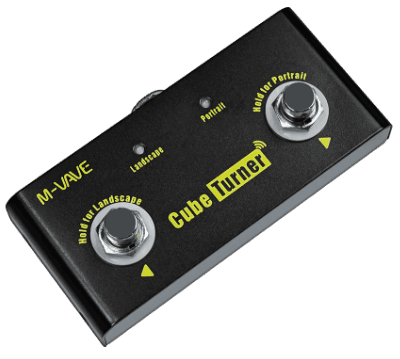
Questions you might have:
- How to use the M-VAVE Cube Turner "page turner"?
- Scrolling doesn't work or is stuttering. What to do?
- What alternatives exist for songbook scrolling?
- Is it possible to scroll only part of a section? A section (verse/chorus) doesn't fit on my display entirely.
- Is it possible for multiple people to control the songbook at once?
- Why is the single-column layout necessary for scroll mode?
- Is it possible for the songbook to scroll automatically?
Pop-up Message Window 💬
Want to play a song from someone else's songbook or another website, or just tell people what you think of them? 😆 Live mode offers the ability to display a message in a pop-up window. Simply type this message in the field in the songbook's bottom dropdown menu and confirm (either with enter or the green button 🟩). The message will be displayed on all devices. With the red X ❌, you can then hide this message from everyone.
You can also insert links to other websites in the message, which is useful mainly for playing songs outside Kytario. You no longer have to tell people to manually search for the song 🙂 (because there's always at least one expert who will open a different version of the same song 🤣).
Writing Songs 📝
Writing songs follows several rules that must be followed for the text to be rendered correctly. The notation consists of several parts:
- Chords (
{Em}) - Fixed Spaces (
{---}) - Bar Separators (
{|}) - Sections (
- Ref.) - Section References (
[Ref.]) - Repetitions (
|: Ha :|)
If you're looking for inspiration on how to write songs efficiently, check out the KytarovkaBrno songbook, from which this entire platform emerged 🙂.
Chords
Chord Formatting
Chords are written in curly braces, e.g. {C}, {Em}, or {C#m7}. The chord tone designation (first character) must always be a capital letter. Chords can also be compound, e.g. {F#m7/G#}, with the tone after the slash indicating the bass tone.
Please write the individual chord types like this:
- Major triad:
- ✅
{C}(notesC - E - G), - ✅
{F#}(notesF# - B - C#), - ❌ Not
{Cmaj}- it's not unambiguous, it can meanC major(C - E - G) orC major7(C - E - G - H).
- ✅
- Minor triad:
- ✅
{Cm}(notesC - Eb - G), - ✅
{F#m}(notesF# - A - C#), - ❌ Not
{Cmi}- that's the English spelling; in Latin, minor is written with a lowercasem.
- ✅
- Dominant seventh:
- ✅
{C7}(notesC - E - G - B), - ✅
{F#7}(notesF# - B - C# - E).
- ✅
- Major seventh:
- ✅
{Cmaj7}(notesC - E - G - H), - ✅
{Fmaj7}(notesF - A - C - E), - ❌ Not just
{Cmaj}without a number - it's ambiguous (see the major triad above).
- ✅
- Minor seventh:
- ✅
{Cm7}(notesC - Eb - G - B), - ✅
{F#m7}(notesF# - A - C# - E).
- ✅
- "Sus" chords:
- ✅
{Csus4}(notesC - F - G), - ✅
{Csus2}(notesC - D - G), - ❌ Not just
{Csus}- always specifysus2orsus4.
- ✅
- Added-tone chords (add):
- ✅
{Cadd9}(notesC - E - G - D), - ✅
{Fadd9}, - ❌ Not just
{Cadd}-addmust always be followed by a number (e.g.add9,add#11).
- ✅
- Augmented chords (aug):
- ✅
{Caug}(notesC - E - G#).
- ✅
- Diminished chords (dim):
- ✅
{Cdim}(notesC - Eb - Gb). But keep in mind that diminished chords are very little known.
- ✅
- Extensions in parentheses:
- ✅
{C7(b9)}(notesC - E - G - B - Db), - ✅
{C(add9)}(notesC - E - G - D).
- ✅
- Slash chords:
- ✅
{C/G}(notesC - E - G, withGin the bass), - ✅
{Em7/F#}(notesE - G - H - D, withF#in the bass).
- ✅
Each song declares in its metadata which notation it is written in - German (... A - B - H - C) or English (... A - A# - B - C). The examples above use German notation. Chords are validated against the notation you choose, so the tone H is only accepted in a German-notation song. 🎼
Readers are not bound by that choice. Everyone picks their own notation in the top language and notation menu, and chords are converted on the fly in both directions:
- A German-notation song shown to a reader using English notation renders
HasBandBasA#. - An English-notation song shown to a reader using German notation renders
BasHandA#(orBb) asB.
The one place where notation is fixed is the PDF - a printed page can't adapt to each reader, so every songbook has its own "PDF song notation" setting that applies to the whole export. 🖨️
Curious why we use Latin chord notation?
💡 Simplicity is strength – if you're writing songs for a wide audience and it's not one that's built on complex chords, we recommend simplifying chords as much as possible.
Chord Position
Chords should be positioned in the notation to precede the word (or letter) they belong to, e.g.:
{A}Na našem {Amaj}rybníku, tam v {A7}ráji řas a vodníků.
If you need to write multiple chords within one word, you can split the word with one or more hyphens, e.g.:
{Em}Má - {G}á - {D}á.
If a chord is played in a part where there's no text, you can offset it with a space on both sides. This will stretch the text around it, e.g.:
{E}Zdá se {F#m}mi, {G#m} je to {F#m}moc let,.
Without this offset, the chord {G#m} would be rendered above the word je.
A cappella / No-chord text
If there's no chord being played in a part of the song, you can write {X} to indicate that the text has no accompaniment, e.g.:
{X}Ale, ale, co to nevidí oko mé modravé.
You have to write this for each line, even if an entire section has no musical accompaniment (recitative, a cappella).
Fixed Spaces
If there's a situation where you need to offset part of the text where there's no chord, you can insert a fixed space into the text. There are 3 different widths of this space, and you can also chain them:
- short:
{-} - medium:
{--} - long:
{---}
💡 Use fixed spaces only in exceptional cases. Ideally, spaces in the text are created by writing a chord surrounded by regular spaces.
Bar Separators
If a section's rhythm is hard to guess from the chords alone, you can mark the bar lines with {|}. It renders as a vertical line in the chord row:
{C}Never {|}{G}gonna give {|}{Am}you up
Bars work in named and unnamed sections alike and can even fall in the middle of a word - the line is then rendered between the syllables:
{Em}Ne{|}ver
In unnamed sections, a bar separator replaces the dash that would otherwise be inserted automatically. This notation:
|: {C}{D}{|}{Em} :|
renders as:
|: C - D | Em :|
Don't confuse {|} with the repetition marks |: and :| - those are a different notation, and both can be freely combined in a single line. The repetition mark naturally already contains this vertical line, so never write |: next to {|}. So this is correct:
|: {C}{D} {|} {Em} :|
And this is incorrect:
|: {|} {C}{D} {|} {Em} {|} :|
They can also help when notating a rest where no chords are played:
{|} {C} {|} {Am}{X} {|}
💡 Bars are completely optional and most songs read great without them 🥁. Reach for them mainly in instrumental breaks or where a chord is held for several bars and it isn't obvious how long.
Sections
Songs consist of sections – verses, choruses, interludes, and others.
Named Sections
Each section containing sung text must be named somehow, either with a number or word.
Names should not be longer than 4 characters and must always start with a minus sign (- Ref1) or plus sign (+ Ref2).
The difference between these two variants is that sections introduced with a minus symbol always display chords – in desktop layout, in print, and on phones. Sections introduced with a plus symbol display chords only in mobile (single-column) layout.
Names can be arbitrary, but we recommend using these conventions:
- Verses:
- 1.,- 2.,- 3., etc. - Choruses:
- Ref.or- Cho.(single chorus) or- Ref1,- Ref2,- Cho1,- Cho2(when choruses have different lyrics) - Pre-chorus:
- Pre.or- Pre1,- Pre2 - Bridge:
- Brid. - Intro:
- Int.(or leave unnamed for chord-only intros) - Outro:
- Out. - Instrumental: leave unnamed
💡 Use numbered variants (
Ref1,Ref2) only when the sections have different content. If a chorus repeats identically, use- Ref.once and reference it with[Ref.].
Unnamed Sections
If a section has no name, its text is not displayed, only chords.
Such a section can additionally contain references to other sections or repetition, e.g.: |: [Ref.][1.][2.] :|
Unnamed sections can have multiple lines and can chain chords, e.g.:
|: [Ref.][1.][2.] :|
[Solo]
|: {C}{D}{Em} :|
[Ref.]
All elements of unnamed sections are automatically interspersed with dashes for better readability. The example above will therefore be rendered as:
|: Ref. - 1. - 2. :|
Solo
|: C - D - Em :|
Ref.
💡 For interludes, solos, intros, and outros, we recommend leaving the section unnamed. From context, it's clear to people that it's probably a solo when there are several chords without text in the middle of the song. This reduces the amount of information on the page. 💡 Only chords and section references are rendered in the unnamed section.
Section References
If a song is too long or sections (e.g., choruses) repeat frequently, it's appropriate to write the section in full only once and reference subsequent occurrences.
Section references are written in square brackets and must contain the entire section name without the introductory character (plus/minus), e.g. [Ref.].
If we have a section:
- Ref.
|: Ja som {F#m}malá Žužu{D}žu, toto {E}je môj mikro{C#m}fón.
Ak mi {F#m}dáte svoj do{D}lár, ja vám {E}zaspievam svoj {C#m}song. :|
we can therefore reference it in any unnamed section using [Ref.].
We can wrap these references in repetition and chain them arbitrarily, e.g.: |: [Ref.][1.][2.] :|. In desktop layout and print, references (and chords) will be interspersed with dashes for better readability, and will therefore be rendered as |: Ref. - 1. - 2. :|. In mobile layout, section references are "expanded" and instead of the reference, the entire content of the given section is rendered. This means there's no need to manually scroll the display to find how that section is played.
Repetitions
Repetitions can be written using the characters |: and :|. Repetitions can span multiple lines of text, but must always stay within one section.
If no count is specified, the passage repeats once (plays twice total). To repeat more times, add the count directly after the closing marker:
|: La la la :|- plays 2 times total (default)|: La la la :| 3x- plays 3 times total|: La la la :| 4x- plays 4 times total
Example: |: {Am}{F}{C}{G} :| 4x creates a 4-bar progression played 4 times.
Any other notation, although it may look graphically similar (e.g., using slashes / and \), is not supported by the system, and repetitions won't be properly expanded.
If a repetition contains a reference to another section and the songbook is displayed in mobile layout, the content of this section will be rendered below. These notations are therefore equivalent:
|: [Ref.][1.][2.] :|
[Ref.][1.][2.] [Ref.][1.][2.].
💡 Repeated parts of songs often contain only minor changes - changing one word or modified phrasing. If you want to simplify the song, instead of two different versions of this part, write just one and put it in repetition. 😉
Parenthetical Annotations
You can add annotations in parentheses for backing vocals, echoes, or performance notes:
- Ref.
Baby {F#m}I don't need {D}dollar bills to have {A}fun tonight. (I {E}love cheap thrills.)
Or for call-and-response patterns:
- 6.
B{Am}rácho, (b{F}rácho)! B{C}rácho, (b{E}rácho)!
These annotations are rendered as regular text with chords. Use them sparingly to indicate backing vocals, audience participation, or echoes.
FAQ
Why is the PDF in A5 format? Can it be printed in A4? 📜
The A5 format was chosen purely for practical reasons - an A4 page usually just doesn't fit in a guitar case. 😆
However, printing on A4 format is possible - for example, in Adobe Reader, just select A4 paper format - horizontal and set the page size to Fit. 🙂
Alternatively, you can choose an alternative and print 2 A5 pages on one A4 page, saving a lot of paper and weight 🌲.
How to approach simplifying chords? 🔪
There are many opinions on how to simplify chords. 🤯 In most cases, however, you can:
- Remove higher tones from the chord - e.g., turn
{Em7}into{Em}. - Replace the chord with its basic power chord form - e.g., turn
{Asus4}into{A}. - Remove the slash (bass) tone - e.g., turn
{C/G}into{C}. - Omit passing chords - those that sound for only one beat of a measure. A typical example from pop music is the progression
{Em}{Em/F#}{G}. Here, the passing chord{Em/F#}is often just an arrangement addition and carries no added musical information. - Replace tones with flats with tones with sharps - i.e., instead of
{Ebm}write{D#m}. Experience has shown that sharps are more readable in text. And if you're a hardcore jazzman 🎷 who doesn't believe in enharmonic substitution, let us know 😆.
Why display some chords only on phones? 📱
This is one of the ways to enable rendering longer songs on one sheet of paper (one screen). If a person sees the entire song on one screen, they can read the chords in repeated sections (verses, choruses) from previous sections. 👁️
In mobile layout, however, a person doesn't see the entire song, but often only one or two sections, so they would have to constantly scroll the text back and forth to read the chords. That's why we recommend writing chords for all sections, and for those where they repeat, introduce the section with a plus symbol (+ Ref2). It's the best solution that considers all players 🙂.
Why can't you change text color, font, and other things? 🌈
Choosing the right colors and fonts is not an easy task. Selecting ones that are easily readable in all possible cases (e.g., during projection or reading from a phone in sunlight) is a task that takes many hours. Besides that, a significant percentage of the population has problems with color perception, contrast, and different types of fonts. 😥
As shallow as the graphic appearance of the Kytario songbook may seem, the display is the result of experience gained at many musical events and situations. For text rendering, we use the Inter font - a very popular and positively rated font nowadays. The text color is then relatively strongly contrasted to make the text more readable in difficult situations (projector, sunlight). 🌞
Thanks to the locked formatting, it's easy to use songs from other songbooks without manual editing. Texts look more professional, are simpler to maintain, and don't create friction points for further platform development. Last but not least, it's guaranteed that saving the songbook to PDF format is error-free, and the PDF is rendered 100% the same on all devices. 💪
Why use Latin chord notation? 🎵
The internet is full of various ways of writing chords, which often don't even correspond to the culture in which the song was created. 😅 There are inconsistencies between these formats, and certain types of notation can be ambiguous. Kytario therefore sticks to Latin (letter) chord names and supports exactly two variants of them - German (A - B - H - C), traditional in Central Europe, and English (A - A# - B - C). 🙂
Which one a song is written in is up to its author, and it changes nothing for readers - everyone selects their preferred notation in the top menu and Kytario converts the chords for them. By keeping the notations to these two well-defined variants, sharing songs between users stays friendly ❤️ - songs look uniform, portable, and unambiguous.
Can a song have more than 2 columns? ✌️
Unfortunately not 😅. The format is standardized this way and adding another column would mean reducing the text size and worsening readability.
If your song is so long that it doesn't fit in two columns, consider displaying chords only in some parts. Two columns are sufficient for almost every situation, even a song as long as Milionář - Jaromír Nohavica. 🥳
How to use the M-VAVE Cube Turner "page turner"? 💡
The M-VAVE Cube Turner is a very simple box, but its operation may not be completely intuitive from the start 😉.
- Always charge the Cube Turner before an event using a USB-C cable. The battery is charging when a small orange LED next to the charging port is lit. When the battery is fully charged, the LED will stop glowing.
- Turn on the Cube Turner to position
I(regardless of whether you have an Android or iOS device). - Turn on Bluetooth on your phone/tablet/PC and connect to the
CubeTurnerdevice. - (Recommended for Android) - in
Settings-Connectionsclick on settings forCubeTurnerand enable input device display.- Since the Cube Turner is considered an external keyboard, some systems will stop showing the "virtual" keyboard on the display after connecting it, because they assume you're using that external keyboard.
- Hold the right button on the CubeTurner, which will light up the "Portrait" LED (we want to scroll vertically).
- In your songbook in Kytario:
- Turn on scroll mode,
- set single-column (mobile) layout,
- select one of the songs and press "Set live".
- On the CubeTurner, briefly press the right button and the first (and following) section will be highlighted 🥳.
Scrolling doesn't work or is stuttering. What to do? 👿
This procedure assumes you're controlling the songbook with an external device ("page turner") connected via Bluetooth to your phone/tablet/laptop.
If you're using CubeTurner, try following all the steps for launching it.
Additionally:
- Verify that the device is connected to your phone and not someone else's.
- Verify that your phone is connected to the internet.
- Verify that there's no metal plate between the device and your phone (e.g., a metal table top) that could interfere with the signal. Bluetooth can be sensitive to interference.
- Visit this page and try pressing the down button/arrow on your device. The code
40 - ArrowDownor38 - ArrowUpshould be rendered on the screen.- If different codes are rendered, your device is sending different characters and needs to be set to send exactly these two characters.
- If no code is rendered, the device is probably not sending any characters, and the error is somewhere outside Kytario.
- In the songbook, verify that you have single-column (mobile) layout enabled.
- Short songs will display in one column even in two-column layout. But scrolling won't work even in this case.
- In the songbook, verify that the song you want to scroll is set live (the "Set live" button is darkened in this case).
- If you have a laptop with a physical keyboard (or a wireless keyboard for phone/tablet), try scrolling using the up/down arrows on this keyboard.
- If this solution works and you've verified all other steps, please let us know 😅.
- If this solution doesn't work either, please also let us know 🤣.
What alternatives exist for songbook scrolling? 🔨
Songbook scrolling can be done by pressing the up and down arrow buttons displayed in the bottom right corner of the screen, or with any device (whether physical or virtual) that can send up arrow and down arrow characters. It can be a primitive "wired" or Bluetooth keyboard operated by someone with free hands (a singer), or practically any device from the "page turner" category.
To verify what characters your device is sending, visit this page and try pressing the down and up arrow on your device. The code 40 - ArrowDown or 38 - ArrowUp should be rendered on the screen.
Some devices allow "remapping" the sent characters and thus setting exactly the required ones.
Is it possible to scroll only part of a section? A section (verse/chorus) doesn't fit on my display entirely. 🐘
Unfortunately, Kytario always scrolls songs by entire sections. If a section doesn't fit on the display, it needs to be manually shortened. We recommend writing songs so that no section has more than 12 lines (i.e., 6 lines of text and 6 lines of chords). This ensures it will be well rendered even on widescreen displays and screens (16:9). 🙂
Remember that projection screens are often deformed at the edges or are obscured, so if you plan to write a song with, for example, 14 lines, it may not be readable everywhere. 💡
Song sections are usually very easy to divide, as modern music is based on repeating phrases. With pop/rock songs, it often happens that what's marked as one verse in a regular songbook is actually two verses, or the chord progression repeats 2x in it.
Is it possible for multiple people to control the songbook at once? 🧑🤝🧑
Partially yes! 🥳 Anyone with editor or administrator permissions for the project in which the songbook was created can control it. However, it always applies that for a user to see the current song, live song tracking must be enabled (i.e., the red live button must be lit in the bottom menu). Clicking this button will "unpair" from live mode, thus enabling songbook control.
If you have multiple people in the group who want to control the songbook, the person currently controlling it needs to have live song tracking disabled (which allows them to control the songbook) and other people need to have tracking enabled.
How do I play a song that isn't in my songbook during a live session? 🎵
No need to add it just for one play. While your live songbook is running, simply copy the URL of the song (from another songbook, or from anywhere on Kytario) and paste it into the pop-up message field in the bottom dropdown menu. 📋
All connected devices will see the link in a pop-up, tap it, and switch over to the song together. When you're done playing, close the pop-up with the red X ❌ and everyone returns to your songbook right where they left off. 🔙
Why is the single-column layout necessary for scroll mode? ⬇️
In the single-column layout, all parts of songs are fully rendered - hidden chords, section references, and also repetitions. To ensure that all devices see the same section, scroll mode is only supported in this layout.
How can I view all songbooks that contain a specific song? 📃
Unfortunately, this information is not available. 😢 This is because Kytario allows the creation of hidden or private songbooks. 🔐 To display this information, data about all songbooks would have to be published, which goes against the idea of this platform 🙂.
However, someone adding your song to their songbook won't interfere with you in any way. You still have the ability to fully edit it or delete it. 💪
⚠️ A public song that becomes private will be removed from all songbooks that don't belong to the same project. This ensures that the song "disappears" from the entire platform, and only you and anyone with access to its project will have access to it.
I want to contribute to songbook development, how to do it? 💪
We'll be grateful for every hand contributing to the work ❤️. Kytario is built on these technologies:
- Next.js - v16, app router, server actions
- Tailwind CSS
- Flowbite React - UI component library
- pnpm
- Prisma ORM
- PostgreSQL
- Sentry
- Grafana
- Ahrefs
- Docker Compose - For dev and production 💪
- nginx-certbot
- RustFS - S3 storage for PDF and JSON cache
- GitLab
- Playwright & Chromium - Printing songbook to PDF
We use all packages and technologies in their latest versions and regularly update them 😉. Contact us at info@zounar.me and we'll arrange the details 🙏.
Is it possible for the songbook to scroll automatically? 🤖
Automatic songbook scrolling - where the page slowly scrolls gradually - is not possible in Kytario. From experience with hundreds of played events, such scrolling seems very error-prone to us, and unsuitable for running musical events (which is the primary purpose of Kytario). 🥲
There are several reasons for this:
- ⌚ The length of section notation doesn't correspond to the time the section is played. For example, a two-line chorus in repetition can sound up to 4x longer than a verse written on 8 lines - it's a very common phenomenon. Automatic scrolling couldn't handle this, so during the chorus you would have to manually scroll the page back.
- ➕ Musicians skip some sections - solos, interludes, repetitions, intros - and add others, even though they're not written.
- 🪘 Without significant training, it's generally difficult to play a song at the exact tempo of the original. It also often happens that a song is played slower or faster depending on the mood.
Scrolling using a "page turner" eliminates these problems and allows absolute control over the song 😉.
I want to bulk import songs from another platform into Kytario. How do I do it? 💾
Unfortunately, Kytario does not support bulk importing of songs - whether via API, an import file, or in any other way. 🥲 The reason is that bulk importing would very likely introduce a lot of errors into the data and provide a false "sense of certainty" that the data is fine.
For each song, you need to fill in its metadata and adjust its notation so that it's easy to read. Quality song notations are a fundamental pillar of the whole platform and the reason it was created - so it's better to go through songs manually, play them a few times, and check whether the chords fit, or whether they could be written more simply. That then saves time and headaches for other musicians playing the song. 💪
Navigating the PDF file is difficult. What to do? ⚡
The PDF of a generated songbook contains hyperlinks that, in common PDF viewers (Adobe Reader, Google Chrome, etc.), let you quickly jump between songs and the table of contents. 🏃♀️
- To jump to a song from the song list, click its title.
- To jump back to the first page of the list, click the song number in the top-left corner, or, if you have a keyboard, use the "forgotten" Home key. 😜